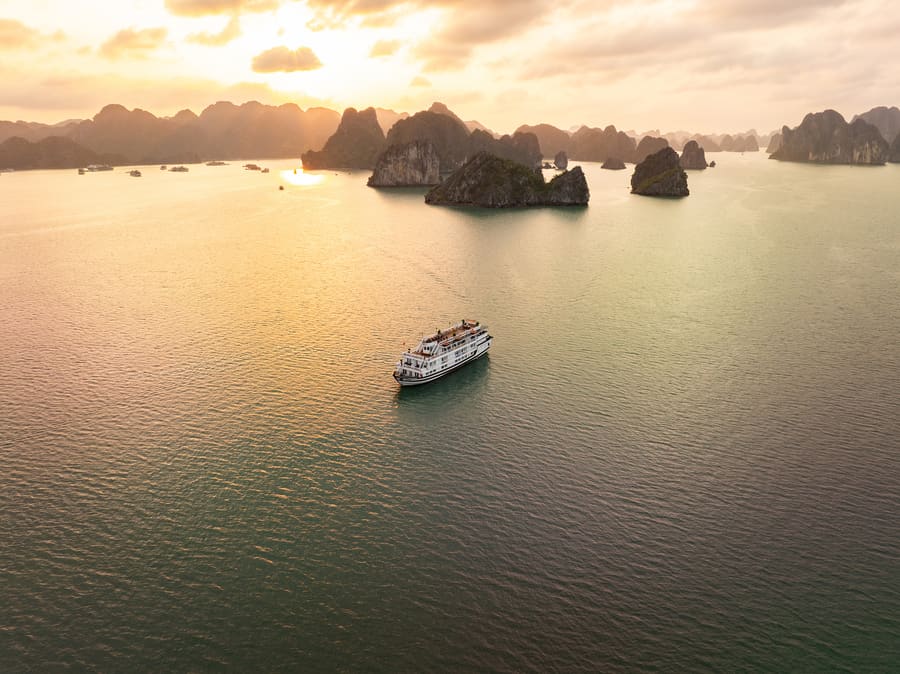
I was at the sundeck bar when a remote worker from Berlin opened his laptop, ran a speed test, and stared at the screen. “Mike, this is 2 megabits.” He said it like a doctor delivering bad news. I poured him a beer and pointed at the karst rising behind the ship — 300 million years of limestone, no cell tower for 15 kilometers. “That’s your router,” I said. He laughed. Then he closed the laptop.
Wifi on a Halong Bay overnight cruise is one of the most frequently asked questions I get — maybe three times a day during high season. After 13 years on this bay and roughly 3,000 sailings across eight ships, here’s the honest truth: connectivity exists, but it’s limited. And for most guests, that limitation becomes the best part of the trip.
At a glance:
- Wi-Fi available on most overnight cruise ships (including Cozy Bay Grand)
- Signal strength: weak to moderate — sufficient for messaging, not for video calls
- Dead zones: certain karst clusters block cellular signal entirely for 20–40 minutes
- 4G cellular: Viettel has the best bay coverage; Mobifone and Vinaphone are weaker
- Best connectivity window: near Tuan Chau Marina (first and last hour of cruise)
- Recommendation: treat the overnight cruise as a digital detox opportunity
The Technical Reality: Why Wifi on a Halong Bay Overnight Cruise Is Limited
Let me explain this from a ship operations perspective, because it’s not about cheap equipment or poor planning.
Halong Bay’s overnight cruise routes run through areas where 1,969 limestone karsts — some rising 200 meters above water — create natural signal barriers. The ship’s wifi router connects to cellular towers on shore via a boosted antenna. When the ship anchors in the inner bay for the night, it’s typically 12–18 kilometers from the nearest tower, with multiple rock formations blocking line-of-sight.
| Factor | Impact on Signal |
|---|---|
| Distance from shore tower | 12–18 km at anchor point — severe signal degradation |
| Limestone karst barriers | Block cellular signal like natural walls |
| Number of users sharing | 36 guests on one router — bandwidth splits quickly |
| Weather | Fog and heavy rain reduce signal by 30–50% |
| Time of day | Evening (everyone online) = slowest speeds |
| Ship position | Moving through karst corridors = intermittent drops |
On Cozy Bay Classic — our old 9-cabin wooden junk — we didn’t even have wifi. Guests used their own phone data and accepted the limitations. On Boutique, we installed a basic cellular router. It worked near shore and failed in the deep bay. On Grand, we upgraded to a higher-gain antenna with a better router. It’s improved, but the physics haven’t changed. Limestone doesn’t care about your router specifications.
🚢 Mike’s Bay Tip: If you need to send one important message or check one email, do it between 11:30 AM and 12:30 PM (first hour after boarding near the marina) or between 9:00 and 10:30 AM on Day 2 (approaching the marina before disembarkation). These windows offer the strongest wifi signal on the entire Halong Bay overnight cruise because the ship is closest to shore towers.
What You Can and Cannot Do with Wifi on a Halong Bay Overnight Cruise
Let me be specific. I’ve watched thousands of guests try to use the internet on this bay:
✅ Works Reliably
| Activity | Speed Needed | Success Rate |
|---|---|---|
| WhatsApp / iMessage text | Very low | 95% |
| Send a single photo | Low | 85% |
| Check email (text only) | Low | 80% |
| Social media browsing (text-heavy) | Low-medium | 70% |
| GPS/maps (offline recommended) | None (offline) | 100% |
⚠️ Works Sometimes
| Activity | Speed Needed | Success Rate |
|---|---|---|
| Instagram upload (single photo) | Medium | 50% |
| Loading web pages with images | Medium | 45% |
| Voice messages (WhatsApp/Telegram) | Medium | 60% |
| Email with attachments | Medium | 40% |
❌ Usually Fails
| Activity | Speed Needed | Success Rate |
|---|---|---|
| Video calls (Zoom/FaceTime) | High | 5–10% |
| Streaming (Netflix/YouTube) | High | <5% |
| Remote work (cloud apps, VPN) | High | <10% |
| Uploading multiple photos | High | 15% |
| Online gaming | High + low latency | <5% |
The remote worker from Berlin tried a Zoom call at 3 PM in the deep bay. It connected for 11 seconds, froze, and dropped. He tried again. Same result. By the third attempt, he was laughing. By sunset, he’d put his laptop in the cabin safe and was photographing karsts with his phone instead. He told me at the bar: “This is the first time in four years I’ve been unreachable. I feel like a different person.”
Your Phone’s 4G: A Better Option Than Ship Wi-Fi
Ship wifi routes through one cellular antenna shared by 36 guests. Your personal phone connects directly to the same towers but doesn’t share bandwidth. In practice, your own 4G data is often faster than the ship’s wifi — especially if you have the right carrier.
Vietnamese Carrier Coverage in Halong Bay
| Carrier | Bay Coverage | Near Shore | Deep Bay (Anchor) | Price (Tourist SIM) |
|---|---|---|---|---|
| Viettel | ★★★★☆ | Excellent | Moderate — drops in karst clusters | ~$5–8/10 days |
| Mobifone | ★★★☆☆ | Good | Weak — frequent drops | ~$4–6/10 days |
| Vinaphone | ★★☆☆☆ | Moderate | Poor — signal loss common | ~$4–6/10 days |
Recommendation: If staying connected matters, buy a Viettel SIM at Hanoi airport or any Viettel shop. It has the most transmission towers covering Quảng Ninh province and the bay. My own phone uses Viettel — it’s what the crew uses because it’s the most reliable on the water.
When the northeast wind picks up to 30 km/h, I check weather updates via my Viettel connection before making routing decisions. If Viettel drops signal, that tells me we’re deep in a karst corridor — which usually means we’re in the most scenic part of the bay. Signal loss and scenic beauty are directly correlated on this waterway.
The Digital Detox Perspective: Why Limited Wifi Might Be the Point
I understand why people search for wifi information about a Halong Bay overnight cruise. Work commitments, family check-ins, social media habits — these are real needs. But I’ve also watched what happens when guests accept the disconnect:
Hour 1–3 (anxiety): Guests check their phones repeatedly. They walk around the sundeck looking for a signal bar. They ask me about the wifi password twice.
Hour 4–6 (acceptance): The phone goes into the pocket. Conversations start — with travel companions, with other guests, with crew. I’ve seen strangers share a bottle of wine on the sundeck because neither had anyone to text.
Hour 7–12 (immersion): The bay takes over. Sunset. Dinner. Stars. Squid fishing. The phone becomes a camera — nothing more. This is the phase where guests stop looking at screens and start looking at the 300-million-year-old landscape around them.
Hour 13–22 (gratitude): By morning, most guests tell me they’re glad the wifi was weak. The overnight experience — sunrise, mist, silence — rewards presence. A screen competes with that presence.
My mother says, “Mắt nhìn vịnh, tay cầm điện thoại — mất cả hai” — eyes on the bay, hand on the phone — you lose both. She’s describing exactly what I see: the guests who get the most from this trip are the ones who put the device away.
Practical Connectivity Tips from the Cruise Manager
After managing wifi expectations across three Cozy Bay ships and four years as CM:
1. Download everything before boarding.
- Google Maps: download “Quảng Ninh” province for offline navigation
- Netflix/Spotify: download episodes/playlists while still in Hanoi
- Translation app: download Vietnamese language pack for offline use
- Important emails: screenshot or download any documents you’ll need
2. Set an out-of-office reply. Tell people you’ll be unreachable for 22 hours. Most guests who do this report feeling relieved within two hours.
3. Bring a power bank. Your phone battery drains faster when searching for weak signals. A 10,000mAh power bank handles a full 22-hour cruise. The cabin has charging outlets (universal), but a power bank lets you charge while on the sundeck.
4. Use airplane mode + wifi selectively. Turn on airplane mode and connect to ship wifi only when you actively need to send a message. This prevents your phone from constantly searching for cellular signal (which drains battery) while still allowing occasional wifi access.
5. If you genuinely need to work: Consider doing the 2D1N cruise over the weekend rather than weekdays. Schedule the cruise as your rest day, not your work day. The bay isn’t a coworking space — it’s a UNESCO World Heritage Site that happens to have 2 megabits of bandwidth.
How Different Cruise Tiers Handle Wifi
| Feature | Budget 3★ | Mid-Range 4★ (CBG) | Premium 5★ |
|---|---|---|---|
| Wi-Fi available | Sometimes | Yes | Yes |
| Speed (typical) | <1 Mbps | 1–3 Mbps | 2–5 Mbps |
| Included in price | Varies | Yes, free | Yes, free |
| Dedicated business center | No | No | Some ships |
| Signal booster quality | Basic | Standard | Premium antenna |
| Honest usability | WhatsApp text only | Messaging + single photo | Messaging + light browsing |
The premium 5-star ships invest in better antenna systems, and some have satellite backup. But even $500/night ships can’t overcome the physics of limestone blocking cellular signals. The wifi on a Halong Bay overnight cruise is fundamentally limited by geography, not by budget allocation.
On my Monday mornings off, I sit at a café in Bãi Cháy with full 4G and respond to every message I missed during the sailing. It takes about 15 minutes. That gap — 22 hours of limited connectivity followed by 15 minutes of catch-up — puts things in perspective. Very few messages were urgent. The bay teaches you that.
My father, who fished these waters for 30 years without a phone, without radio, without GPS, navigated by the stars and the current and the shape of the karsts. He says, “Trước khi có sóng điện thoại, có sóng biển” — before there were phone signals, there were ocean waves. He found his way home every night. The wifi question would puzzle him entirely.
See you on the bay. I’ll save you the good seat at the bar — yes, the manager still pours drinks here. — Mike 🌊
Related Guides
- 📖 Cozy Bay Grand Cruise Review 2026: Our Complete Overnight Experience
- 📖 Halong Bay Overnight Cruise for First-Time Vietnam Visitors: Full Prep Guide
- 📖 Photography Tips for Overnight Cruise Halong Bay: Best Shots & Timing
- 📖 Cozy Bay Grand Cabin Guide: Deluxe Sea View vs Balcony vs Premium Terrace
📌 Official resource: Hạ Long Bay — Wikipedia